Plane Spotting
Introduction
📘 About the post
This project was completed for Assignment 1 in CSCI 6510: Trustworthy AI, a course exploring the opportunities, limitations, and risks of modern AI systems.
Learn more: Trustworthy AI – CSCI 6510
As AI systems are increasingly used for more complex tasks, there is growing interest in systems that can do more than generate text responses. Agentic systems can work through a problem over multiple steps, use tools and external information, and make decisions about how to proceed based on what they find. This makes them particularly useful for tasks that involve several stages, or where the path to a solution is not entirely known in advance.
For this assignment, we were tasked to explore how these capabilities could be applied to a problem of our choosing.
Why Aircraft Spotting?
For my project, I wanted to choose a problem where I had enough background knowledge to evaluate the agent’s results critically. Given my niche expertise in air traffic control research, aircraft identification was a natural choice.
At first glance, aircraft identification appears to be a traditional classification problem: show a computer vision model an image of an aircraft and ask it to identify the type. In practice, however, the process is rarely that simple. To accurately identify an aircraft spotters may rely on a combination of visual details, including:
- Fuselage proportions
- Wing shape
- Engine placement
- Cockpit windows
- Landing gear
- Tail geometry
Additional context can also provide important clues. Airline liveries, for example, can help identify the operator, while fleet information can narrow down which aircraft types that airline actually operates. These observations can then be verified through external sources such as web searches. Therefore, accurately identifying an aircraft type may require combining several pieces of visual and contextual evidence.
This combination of visual analysis, external information, and step-by-step reasoning made aircraft spotting a useful problem for exploring an agentic approach. It led to the central question:
Could an AI agent use multiple sources of information to help identify and organize aircraft captured on video?
What Does the Agent Need to Do?
The task was to take a video containing multiple aircraft movements and turn it into a set of organized, identified clips. To do that, the agent needed to:
- Review the full video
- Find each aircraft present in the video
- Separate the aircraft movements into individual clips
- Identify the aircraft using both visual evidence and supporting data sources
Writing the Prompt as a Project Brief
Rather than giving the agent a short instruction and leaving the rest open to interpretation, I treated the prompt more like a project brief.
It helps to think about the opposite. Imagine being handed a task at work with barely any context. You would probably have questions almost immediately: What exactly am I trying to achieve? What information should I use? What should the final result look like? The less detail you are given, the more you have to fill in the gaps yourself. And while agents can decide how to approach a task, they face much the same problem. They still need enough context to understand the goal, know what resources are available, and make sensible decisions along the way.
In this prompt, I defined the objective, specified the tools and data sources the agent could use, and highlighted the details that mattered when identifying each aircraft. The aim was to give the agent a clear procedure to work with.
The instruction set can be accessed by clicking on the box below:
You are an autonomous video-processing assistant for an avid plane spotter.
Context
The plane spotter records long plane-spotting sessions and later manually separates the footage into individual aircraft movements. Each movement should become its own video clip and be classified and organized. Because the plane spotter now has limited time, your task is to automate as much of this workflow as reasonably possible.
From there, the overall workflow can be summarized as an agentic loop:
This agentic loop is written out in the prompt, which is separate from the instruction set above. I ran the agent using Claude Opus 5, the latest Claude Opus model available at the time of writing. Read the prompt ↗
Generated Output
The task produces a collection of organized video clips, along with files recording how the work was completed and how the agent reasoned behind each identification.
To make the results easier to review, I also tasked the agent with producing a webpage. The webpage can be accessed by clicking on the image below:
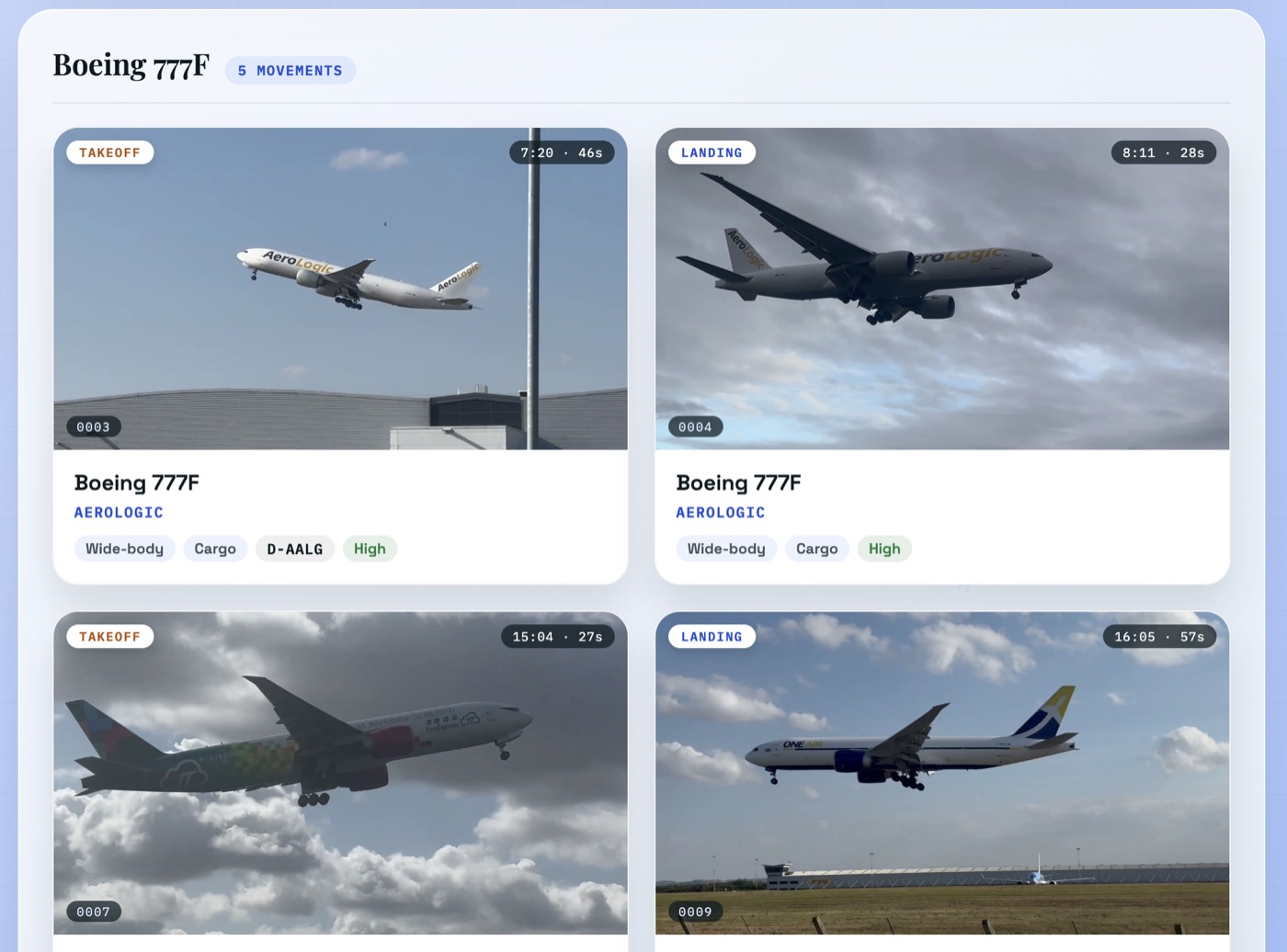
The agent also produced a detailed processing log documenting its reasoning and workflow:
AIRCRAFT MOVEMENT EXTRACTION - PROCESSING LOG
East Midlands Airport (IATA: EMA / ICAO: EGNX), Castle Donington, Leicestershire
Processed: 2026-09-07
Operator of pipeline: autonomous video-processing assistant
Interesting Observations
1. Reasoning about where to clip: One of the interesting observations for me was how the agent kept changing its approach to generating a clip. It first tried image-based scene detection, then moved to frame differences and audio based detection, and eventually, it settled on a more systematic visual review, to find reliable clip boundaries. I found it interesting to see the agent move between methods, and when the approach did not work, it reasoned to find a better approach.
--------------------------------------------------------------------------------
3. MOVEMENT DETECTION - WHAT WORKED AND WHAT DID NOT
--------------------------------------------------------------------------------
Attempt 1 - ffmpeg scene detection (`select='gt(scene,0.25)')`.
  RESULT: FAILED. Zero cuts detected across the whole video; the maximum scene score
  anywhere was 0.238. Cause: the compilation is shot largely from fixed vantage points
  around the same airfield, so a cut from one recording to the next produces almost
  identical colour histograms (sky over grass over runway). Histogram-based scene
  detection is blind to these cuts.

Attempt 2 - raw frame-difference (mean absolute difference at 96x54 grey, all 41,149
  frames), plus a "peak sharpness ratio" (instantaneous difference divided by the local
  median difference) designed to separate instantaneous cuts from sustained panning.
  RESULT: PARTIAL. It found a handful of genuine cuts (05:31, 08:00, 14:06, 20:03) but
  was dominated by false positives from (a) the camera panning to track aircraft and
  (b) regularly spaced (~1.23 s) anti-collision beacon flashes at 12:02-12:15 and
  15:51-15:59, which produce large brightness deltas that mimic cuts.

Attempt 3 - audio discontinuity (log-RMS envelope at 0.1 s resolution).
  RESULT: WEAK. The soundtrack is dominated by wind and near-continuous engine noise
  and appears loudness-normalised, so the envelope sits at 6-8/8 almost throughout and
  discriminates poorly. It did reliably mark a few hard cuts by near-silence
  (00:08-00:13, 08:08, 12:56, and the 22:46 outro).

Attempt 4 - aircraft-presence timeline from object detection.
  1,373 frames sampled at 1 fps were run through YOLO11; an aircraft was detected in
  1,232 of 1,373 frames (89.7%). Because aircraft are visible for nearly the whole
  video, presence alone produced only 11 blocks, the largest spanning 6m48s and
  containing many separate events. Insufficient on its own.

METHOD ACTUALLY ADOPTED - systematic visual review.
  The full video was rendered as 20 labelled contact sheets (one frame every 2 s,
  timestamp burned in), and every ambiguous region was re-rendered at 1-second
  resolution. Movement boundaries, landing-versus-takeoff calls and aircraft
  identification were then made by direct inspection, using the detector only to
  locate the aircraft within each frame for automatic high-resolution zoom crops.
  This was slower than an automatic cut list but is the only approach that produced
  reliable boundaries on this material.
2. Compiling different pieces of information: Another interesting observation was how the agent combined several clues to arrive at an aircraft identification. The model appeared to reason across airframe geometry, livery, aircraft registration, and published fleet or route information rather than relying on any single feature. For example, in one instance, it identified an aircraft as an A321neo partly because Jet2’s “only Airbus type” is the A321neo.
Airbus A321neo — Jet2
- Clip
- 0001
- Registration
- Unknown
- Airport
- EMA / EGNX
- In the source video
- 00:00:16 – 00:01:33
- Duration
- 77 s
Departure filmed from beyond the runway end; take-off roll visible from ~00:36 and rotation ~00:41, then climb-out overhead. 'Jet2holidays' titles clearly legible. Airbus A320-family confirmed by sharklet wingtips, large circular engine nacelles and Airbus fin/stabiliser shape; A321neo inferred because the A321neo is Jet2's only Airbus type. Boeing 737-800 considered and rejected on wingtip and nacelle shape. Registration not legible.
Footage © EMAplanespotting · watch this moment ↗
3. Reasoning through visual features: It was also interesting to see how the agent was able to capture text on the belly of an aircraft, which, to me at least, looks very difficult to read.
ATR 72-600 — Loganair
- Clip
- 0002
- Registration
- Unknown
- Airport
- EMA / EGNX
- In the source video
- 00:01:34 – 00:02:39
- Duration
- 65 s
'Loganair' titles and logo legible on the lower fuselage during the overhead pass. High-wing twin turboprop with T-tail identifies the ATR family; ATR 72-600 inferred from Loganair's current turboprop fleet (ATR 42 cannot be fully excluded from this angle). Landing gear seen retracting during the climb confirms Takeoff. A registration is painted on the wing but is not legible.
Footage © EMAplanespotting · watch this moment ↗
Was it Correct?
The results produced by the agent were largely accurate, particularly in cases where it expressed a high degree of confidence. Nevertheless, several examples show that the model could still arrive at incorrect conclusions.
One clear example is a DHL aircraft that the agent classified as taking off, even though the footage clearly shows the aircraft landing.
Unknown — DHL
- Clip
- 0008
- Registration
- Unknown
- Airport
- EMA / EGNX
- In the source video
- 00:15:33 – 00:16:04
- Duration
- 31 s
Night departure. DHL identified with confidence from the yellow fin carrying the red DHL logo. The aircraft is a twin-engine jet freighter but the darkness prevents a reliable variant call between the Boeing 757-200F and 767-300F that DHL operates at EMA, so the model is recorded as Unknown rather than guessed. Small operator titles are present on the forward fuselage but could not be resolved.
Footage © EMAplanespotting · watch this moment ↗
Another notable error concerns the identification of the airline. In one case, the model’s reasoning initially suggested that the aircraft belonged to the AirOne fleet, yet its final classification assigned it to One Air. This discrepancy was likely caused by conflation, as several One Air aircraft appeared elsewhere in the video and may have influenced the model’s final prediction.
Boeing 747-400F — One Air
- Clip
- 0005
- Registration
- Unknown
- Airport
- EMA / EGNX
- In the source video
- 00:08:40 – 00:09:20
- Duration
- 40 s
Four-engine Boeing 747-400 freighter wearing the red AeroTransCargo 'atc' tail with 'AIRONE' fuselage titles. One Air leases its 747-400F/747-400ERF aircraft from AeroTransCargo, which explains the mixed markings. A Moldovan ER- registration is painted on the rear fuselage but is not legible. -400F versus -400ERF could not be determined.
Footage © EMAplanespotting · watch this moment ↗
These were not the only errors observed. Several other inconsistencies appear throughout the model’s reasoning, including incorrect timing of the different stages of takeoff, such as rotation and initial climb. Rather than cataloguing every individual instance here, I leave these additional examples for the reader to explore through the interactive interface.
Would I Trust the Results?
As for whether I would trust the results, I would do so only after visually reviewing the aircraft and verifying that the agent’s classification is supported by the available evidence. I would treat the agent’s output as a possibility rather than as a definitive truth, particularly in cases where the identification is uncertain.
Although the agent was largely accurate, several examples were observed to have been misclassified. These included incorrect airline identifications, confusion between different stages of flight, and cases where the final classification did not fully align with the model’s own reasoning. With a longer plane spotting video, it is reasonable to expect that additional misclassifications of this kind could occur.
Nevertheless, the tool could still be highly valuable because it could significantly accelerate the aircraft identification process by quickly narrowing down possible aircraft types, airlines, and flight phases. Human review could then serve as a validation step, helping resolve ambiguous cases and correct occasional errors.
Conclusion
Overall, I see the agent as a promising tool for assisting with aircraft identification. Its ability to quickly narrow down possible identifications could make the process more efficient, while the errors we observed highlight the importance of keeping a human involved in the final decision.
Footage by EMAplanespotting, from “20 + mins of awesome landings and takeoffs at East Midlands Airport”. All rights remain with the channel.
Code and outputs: CSCI-6510-Trustworthy-AI / assignment_1